I just solved Cap from Hack the Box!
Cap Machine Summary
The HTB Cap machine is an easy-level Linux machine with an HTTP server that allows users to capture non-encrypted traffic. It provides opportunities to exploit vulnerabilities, including an insecure direct object reference (IDOR) on its website. The capture contains plaintext credentials and can be used to gain foothold. A Linux capability is then leveraged to escalate to root.

About the Vulnerability
Cap HTB machine has two security flaws. One, is a website with an insecure direct object reference (IDOR) vulnerability, that stores a Wireshark packet file and also allow you to view and download other users Wireshark packet file by editing the URL header. This vulnerability allow users of the website access FTP credentials of other users, thereby allowing SSH access as that user.
How to pwn the machine
Like every other machine, the first step is downloading the lab access file on Hack the Box and connecting Kali Linux terminal to Hack the Box server by running the following command in Kali Linux terminal:

After connecting Kali Linux terminal with Hack the Box server, the next step was performing Nmap enumeration to find open ports that are available on the host machine by running the following commands in the terminal:

I found three ports open on the targets machine, which includes 21/tcp, 22/tcp and 80/tcp. Once, the nmap scan has been successfully completed, the next step was adding the IP address of the cap machine to the /etc/hosts file by running the following commands in the terminal:


Once I have added this to the /etc/hosts file, to save the file, I pressed and hold Ctrl + X to save, press Y to modify the buffer and X to exit. Next, I visited 10.10.10.245 on my browser and I was redirected to the security dashboard of the cap machine.

I navigated my way around the dashboard, looking for vulnerabilities that I could exploit, but I couldn’t find any. I stumbled upon an interesting thing on the Security Snapshot tab, I noticed that the path in the URL includes a number at the end. I changed the value of this number several times and discovered some changes in the data (Number of Packets, IP Packets, TCP Packets, and UDP Packets).


Initially in the URL bar of the security snapshot is the following URL 10.10.10.245/data/8, I changed the value of the last character (8) to 7, 6, 5, 4, 3, 2, 1, and 0. I noticed an increase in the number of data types for Number of Packets, IP Packets, TCP Packets, and UDP Packets.
After changing the URL to 10.10.10.245/data/0, I clicked on the “Download” button to download the Wireshark file on my Kali Linux. Then, I opened the Wireshark file by running the following command in my terminal:

This launched the Wireshark interface and I filtered my pane by switching to the “Hash” pane area which shows a hexadecimal representation of the packet’s contents, allowing for quick verification and comparison.

I found a request with a PASS header value of Buck3tH4TF0RM3! which looks suspicious. I right clicked and chose “follow” and clicked on “TCP Stream”

This opened the request in a text editor and I found the following credentials (user: Nathan and password: Buck3tH4TF0RM3!)

Once I had copied the password, the next step was obtaining a secure encrypted connection to user Nathan by typing the following command on the terminal:

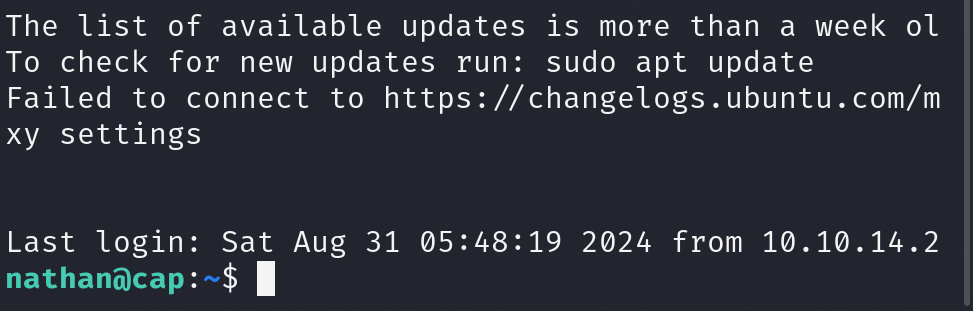
I pasted the password of user Nathan from the Wireshark file I analyzed as Buck3tH4TF0RM3! and it worked. I got a shell as user Nathan. Like I always do, I listed all the files in the directory by running the ls command and there I found the user.txt file. To read the content of the file, I ran the cat command and there I got my user flag!

Hurray, I got the user flag!!!

The next step was obtaining the root user flag. Firstly, I tried some privilege escalation but none of it worked. Then I tried to locate some files with specific permissions on a Linux system by running the following command:
-perm /4000 specifies that the command should search for files with the execution bit set (4) and the read and write bits for owner (2) and group (0). The 2>/dev/null part redirects any error messages to the null device, suppressing them from the output. The find command searches the root directory (/) and its subdirectories for files matching the specified criteria, printing the absolute path of each matching file to the console.

Afterwards, I created a Python file that allows me to run sudo (admin) privileges by creating a file called exploit.py
To create the file, I ran the following command in my terminal:

This opened the GNU interface, then I pasted the following lines of code inside to gain privilege into the system.

I pressed and hold Ctrl + X, then press Y and Enter to save the file. Next, I ran the exploit.py file against python by running the following command:
This command executed the exploit.py file and I was able to obtain the shell at root. Next I listed all the files and couldn’t find the flag, then I changed the folder to root and listed all the files in the directory, there I found the root .txt file.

To read the content of the file, I ran the cat root.txt and there I got my flag.

That’s how I got the root flag. If you enjoy reading my writeup and would love to see more of it, kindly consider subscribing to my YouTube channel and following me on my other social media accounts.
- Subscribe to my YouTube channel: https://www.youtube.com/@BoltechTechnologies1
- Follow me on LinkedIn: https://www.linkedin.com/in/isiaq-ibrahim-468588156/
- Follow me on Twitter: https://x.com/Isiaq_Ibrahim99
- Follow me on Twitter: https://x.com/BoltechNG
- Follow me on Medium: https://medium.com/@ibrahimbolaji50.ib
This walkthrough was first published on Medium on August 31st 2024. The walkthrough had 27 views and 15 reads on Medium and 1,999 views on YouTube.


Keywords:
cobblestone htb writeup
cobblestone htb walkthrough
cobblestone hack the box write up
cobblestone hack the box walkthrough
cobblestone.htb
cobblestone HackTheBox
HackTheBox | Cobblestone HTB machine season 10 complete walkthrough
cobblestone htb machine user flag
cobblestone htb machine root flag
checkpoint.htb
checkpoint hack the box writeup
checkpoint hack the box walkthrough
checkpoint htb machine write up
checkpoint htb machine walkthrough
I just solved checkpoint from Hack the Box
checkpoint htb machine user flag
checkpoint htb machine root flag
HackTheBox | Checkpoint htb season 10 machine complete walkthrough
pingpong htb writeup
pingpong htb walkthrough
pingpong.htb
ping.htb
pong.htb
pingpong hack the box writeup
pingpong hack the box walkthrough
I just solved pingpong from hack the box
HackTheBox | PingPong htb season 11 machine complete write up
pingpong htb machine user flag
pingpong htb machine root flag
reactor htb writeup
connected htb writeup
reactor htb walkthrough
htb reactor writeup
htb connected writeup
reactor writeup
connected htb walkthrough
htb connected walkthrough
htb reactor walkthrough
reactor htb write up
reactor writeup htb
hackthebox reactor writeup
reactor hackthebox writeup
connected htb write up
hackthebox reactor walkthrough
reactor hackthebox walkthrough
reactor walkthrough htb
connected.htb writeup
connected hackthebox writeup
hack the box reactor writeup
htb "connected" writeup
connected hack the box writeup
hackthebox connected writeup
reactor write up
connected htb machine writeup
hack the box reactor walkthrough
connected writeup htb
htb connected machine walkthrough
htb reactor machine walkthrough
htb connected write up
hackthebox reactor machine walkthrough
"connected" htb writeup
reactor.htb writeup
reactor hack the box writeup
hack the box connected writeup
logging htb writeup
logging htb walkthrough
htb logging walkthrough
htb logging writeup
logging hackthebox walkthrough
logging hackthebox writeup
logging htb write up
"logging" htb writeup
hackthebox logging writeup
logging htb machine writeup
hackthebox logging walkthrough
logging hack the box writeup
logging.htb walkthrough
logging.htb writeup
htb logging write up
hack the box logging walkthrough
logging writeup htb
htb "logging" writeup
htb logging machine writeup
htb logging machine walkthrough
logging htb github
hackthebox logging machine writeup
hack the box logging writeup
logging writeup hackthebox
logging hack the box walkthrough
cctv htb writeup
cctv htb
cctv htb walkthrough
htb cctv writeup
htb cctv walkthrough
htb cctv
hackthebox cctv
cctv hackthebox writeup
cctv hackthebox
cctv writeup htb
hackthebox cctv writeup
cctv hackthebox walkthrough
cctv htb write up
cctv walkthrough htb
hack the box cctv writeup
hackthebox cctv walkthrough
hack the box cctv
cctv hack the box walkthrough
cctv hack the box
cctv.htb writeup
hack the box cctv walkthrough
cctv htb lab
htb cctv machine walkthrough
cctv htb machine
cctv machine htb
hackthebox cctv machine walkthrough
cctv writeup hackthebox
cctv hack the box writeup
cctv hackthebox machine
htb cctv machine
hackthebox cctv machine writeup
helix htb
htb helix
helix hackthebox
helix hack the box
helix.htb
hack the box helix
hackthebox helix
eloquia htb
helix machine htb
"helix.htb"


0 Comments